ai study guide maker · 16 min read
AI Study Guide Maker: How to Choose the Right Tool for Your Needs
Compare top AI study guide makers, including free options and platform-specific tools. Discover which tool fits your study workflow and budget best in 2026.
Published October 31st, 2026 · Study Slay team

An AI study guide maker transforms scattered lecture notes, lengthy PDFs, and dense textbook chapters into organized, quiz-ready summaries in minutes. Choosing the right one depends on whether you prioritize free access, seamless PDF support, or integration with your existing note-taking workflow, and this guide walks you through the actual differences that matter for students.
What Makes a Strong AI Study Guide Maker?
A strong AI study guide maker extracts key concepts from your source material, structures them logically, and delivers outputs you can actually study from without heavy manual editing. The best tools handle multiple input formats (uploaded PDFs, pasted text, lecture recordings, YouTube links), produce clean hierarchical summaries with headings and bullet points, and often generate supplementary study assets like flashcards or quizzes from the same source. Speed, accuracy, and output clarity separate the merely functional from the genuinely useful.
The technical foundation matters too. Tools built on newer language models tend to preserve context better across long documents, reducing the risk of fragmented or repetitive summaries. Look for platforms that let you re-run or refine outputs if the first pass misses important details, and that store your study guides in a searchable library rather than forcing you to download and manage files manually.
How Do Free AI Study Guide Makers Compare to Paid Options?
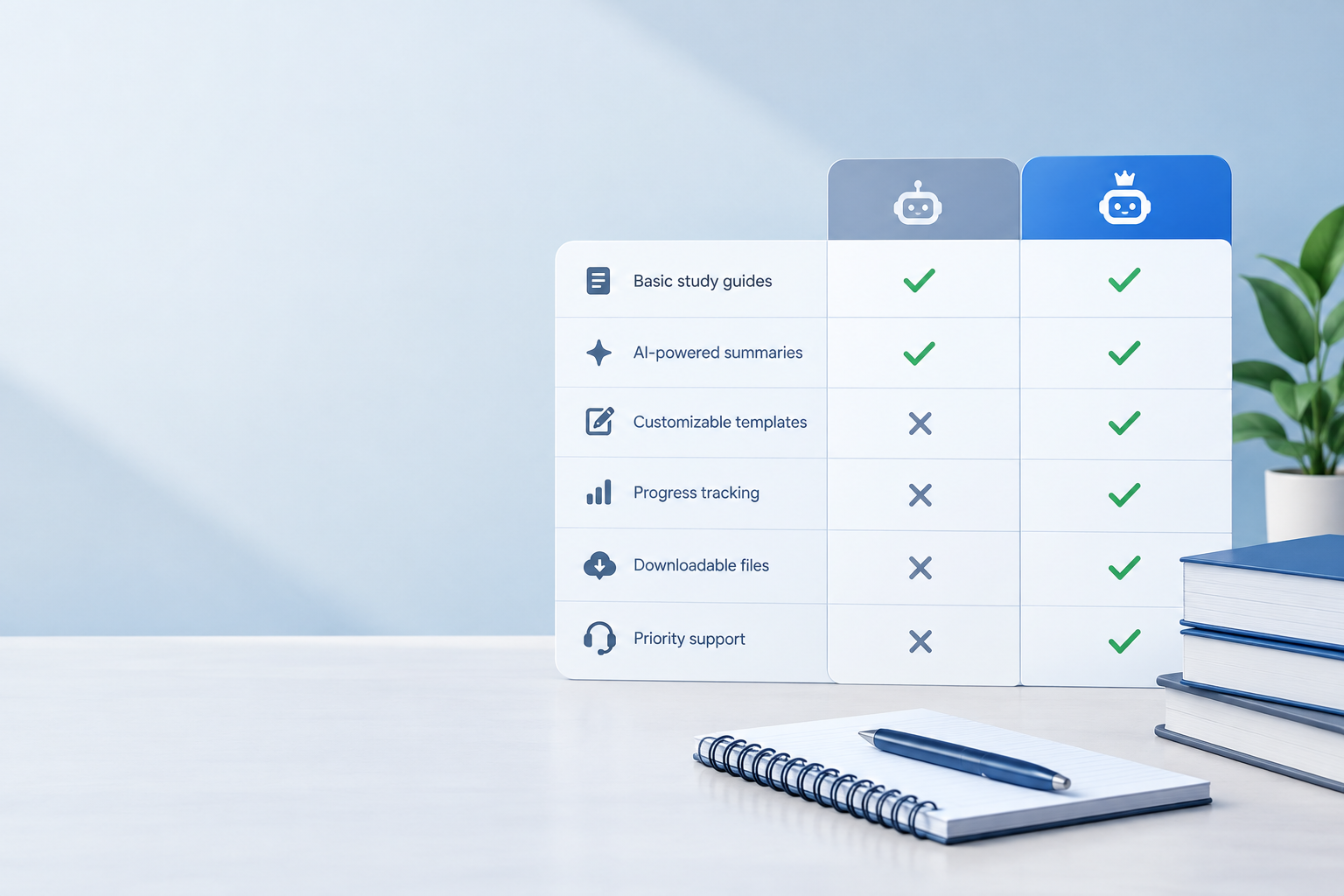
Free AI study guide maker tools typically impose limits on monthly usage, document length, or output format, while paid tiers unlock unlimited generations, longer input support, and features like collaborative sharing or mobile sync. Many platforms offer a free tier sufficient for light use (a few PDFs per week, shorter lecture recordings) but require an upgrade once you hit midterms or finals and need to process dozens of documents quickly.
The quality gap between free and paid is often smaller than the convenience gap. A free tool may produce summaries just as accurate as a premium one, but force you to wait in a queue, cap file size at 10 pages, or strip out quiz generation. If you are juggling multiple courses with heavy reading loads, the time saved by unlimited access and batch processing often justifies the cost. If you need a study guide for one or two exams per semester, free options can cover you completely.
What Is QuillBot AI Study Guide Maker Known For?
QuillBot AI study guide maker is part of QuillBot's broader suite of writing and paraphrasing tools, designed to summarize and restructure text for academic use. It excels at condensing long articles or essay drafts into concise bullet points, making it popular among students who already use QuillBot for grammar checking or citation generation and want a one-stop platform for writing and study prep.
The tool's primary strength is text-based input. Paste in a chapter excerpt or lecture transcript and it delivers a hierarchical outline quickly. However, it is less robust for multimedia sources like recorded lectures or YouTube videos, and its free tier caps summary length aggressively. Students who work heavily from PDFs or audio recordings may find the input workflow cumbersome compared to platforms built specifically for multi-format study content.
How Does Piktochart AI Study Guide Maker Differ?
Piktochart AI study guide maker focuses on visual study aids, turning text summaries into infographics, charts, and illustrated one-pagers rather than plain-text outlines. This makes it a strong fit for visual learners or students preparing presentations, poster sessions, or collaborative group study sheets, but a less obvious choice for solo exam cramming or flashcard-style review.
The workflow involves uploading or pasting your source material, selecting a visual template, and letting the AI populate it with key points. The result is polished and shareable, but editing or drilling down into details requires more manual work than a text-first tool. If you need a study guide you can skim and annotate quickly, a visually designed layout may add friction; if you need something to print and pin on your wall or share on a group chat, Piktochart delivers.
What Sets iWeaver AI Study Guide Maker Apart?
iWeaver AI study guide maker emphasizes cross-platform note integration and permanent storage, positioning itself as both a study guide generator and a personal knowledge base. It ingests PDFs, web articles, and notes, then organizes outputs into a searchable library you can revisit semester after semester, making it particularly useful for cumulative exams or ongoing research projects.
The tool's tagging and linking features let you connect related study guides across courses, surfacing patterns or overlapping concepts automatically. This is valuable for interdisciplinary students or anyone building long-term reference material, but may feel over-engineered if you just need a quick summary for next week's quiz. The learning curve is steeper than simpler alternatives, so budget time to set up your workspace and tags before exam week hits.
Which AI Study Guide Makers Work Best From PDF Free?
AI study guide maker from PDF free tools include platforms that accept direct PDF uploads on their free tier without requiring a credit card or subscription. Study Slay, for example, lets you upload PDF textbook chapters and generates structured notes, flashcards, and quizzes in one workflow, all accessible from any device. Other options may limit PDF page count or processing speed on free plans, so check the fine print before uploading a 50-page journal article.
The quality of PDF extraction varies. Tools that preserve formatting, equations, and diagrams deliver more accurate summaries for STEM material, while simpler parsers may skip figures or mangle complex tables. Test your chosen tool with a short sample PDF before committing to a full study session, and have a backup ready if the output quality is not sufficient for your subject.
What Does Scribe AI Study Guide Maker Offer?
Scribe AI study guide maker is designed primarily for documentation and process capture, generating step-by-step guides with screenshots and annotations automatically as you perform tasks on your computer. While not a traditional study tool, it can be repurposed for procedural learning in software, lab protocols, or technical coursework where you need to document and review workflows.
The interface records your actions (clicks, navigation, typed text) and compiles them into an illustrated guide. This is powerful for hands-on subjects but offers little value for reading-heavy humanities or social science courses. If your study needs involve memorizing concepts rather than repeating procedures, a text- or flashcard-focused tool will serve you better.

How Do Reddit Users Rate the Best AI Study Guide Makers?
Best AI study guide maker Reddit threads consistently highlight speed, accuracy, and the ability to handle real student workflows (messy lecture slides, scanned textbooks, YouTube lecture series) as top criteria. Users praise tools that integrate with existing study apps, offer offline access, and do not require uploading sensitive academic material to unfamiliar servers.
Common complaints center on over-promising marketing versus actual output quality, aggressive paywalls after the first few uses, and tools that work well for general knowledge but fail on technical or niche subjects. Redditors often recommend trying three or four options with the same source document to compare results directly, rather than relying on feature lists alone. Honest peer reviews and screenshots of actual outputs carry more weight than polished landing pages.
What Are Students Saying on AI Study Guide Maker Reddit Threads?
AI study guide maker Reddit discussions reveal that students value transparency about pricing, data privacy, and whether the tool truly understands domain-specific terminology. Many users report frustration with tools that work beautifully on history or literature but garble chemistry equations or programming syntax, emphasizing the importance of subject-specific testing before finals week.
Frequent recommendations include checking whether a tool lets you edit outputs inline, export to common formats (PDF, Markdown, Anki), and sync across mobile and desktop without friction. Students also warn against tools that require installing browser extensions with broad permissions or that lock your study guides behind a subscription you cannot export from if you cancel. Portability and control over your own notes matter as much as the initial generation quality.
Is There a Google AI Study Guide Maker?
Google AI study guide maker is not an official standalone product, but Google's AI tools (Bard, now integrated into Gemini, and various Workspace features) can be used to generate study summaries from documents stored in Google Drive or pasted into the chat interface. This approach works well if you already organize coursework in Drive and want a quick summary without switching platforms.
The limitation is that these general-purpose AI assistants lack study-specific features like automatic flashcard generation, spaced repetition scheduling, or quiz creation. You get a text summary, which you then need to format, review, and convert into study materials manually. For students who want an end-to-end study prep workflow, a dedicated AI notes platform will save hours of post-processing work.
Should You Choose a Specialized or General-Purpose AI Tool?
A specialized AI study guide maker is built with student workflows in mind, offering features like automatic heading extraction, concept linking, quiz generation, and mobile-friendly review modes out of the box. General-purpose AI tools (ChatGPT, Claude, Gemini) are more flexible and can handle unusual requests, but require you to craft effective prompts, manually format outputs, and manage storage yourself.
For routine study prep across multiple courses, specialized tools reduce friction and decision fatigue. For one-off creative study projects (turning a novel into character maps, generating debate prep from case law), general-purpose tools offer more room to experiment. Most students benefit from having one dedicated study platform as their daily driver and keeping a general AI assistant on hand for edge cases.
How Important Is Multi-Format Input Support?
Multi-format input support is critical because student materials rarely arrive in one tidy format. You might record a live lecture, download a professor's PDF slides, skim a YouTube review video, and highlight a textbook chapter, all for the same exam. A tool that handles audio, video, PDFs, and raw text in the same workspace eliminates the need to juggle multiple apps or manually transcribe recordings.
Study Slay, for instance, accepts lecture recordings, YouTube links, PDFs, and documents, then generates unified notes and study materials across all of them. This consolidation saves time and ensures your study guide reflects everything covered, not just the materials that happen to fit one tool's input requirements. If a platform only accepts text, you will spend hours copying and pasting or transcribing, which defeats the purpose of automation.

What Role Does Output Customization Play?
Output customization determines whether a study guide matches your learning style and exam format. Some students need detailed outlines with every sub-point preserved; others want ultra-condensed summaries they can skim in five minutes. The best tools let you toggle verbosity, choose output structure (bullet lists, paragraphs, tables), and refine sections that missed key details on the first pass.
Advanced customization includes filtering by topic (only generate notes on chapter three), merging multiple sources into one unified guide, or exporting directly to flashcard apps like Anki. If a tool locks you into a single output format with no editing, you are stuck unless it nails your needs perfectly the first time. Look for platforms that treat the AI output as a draft you can shape, not a final product you must accept as-is.
How Does Pricing Structure Affect Your Choice?
Pricing structure affects whether you can afford consistent access throughout the semester or only during exam weeks. Some platforms charge per document processed, others offer unlimited use within a monthly subscription, and a few remain entirely free with ads or data-sharing trade-offs. Calculate your expected usage (number of PDFs, hours of lecture recordings, frequency of quiz generation) and compare that against each tool's limits.
Pay-as-you-go models work well for light, irregular use but can become expensive fast during finals. Flat monthly subscriptions provide predictable costs and unlimited access, which reduces stress when you need to process a dozen sources in one night. Always check whether a free trial includes full feature access or just a limited preview, and read cancellation terms before entering payment details. For current pricing details on Study Slay's plans, visit the pricing page.
Can You Trust AI-Generated Study Guides for Accuracy?
You should treat AI-generated study guides as a high-quality first draft, not gospel truth. Modern language models are excellent at identifying main ideas and structuring information, but they can occasionally misinterpret nuanced arguments, skip over critical caveats, or confidently state plausible-sounding errors. Always cross-reference your study guide against original sources before an exam, especially for technical definitions, dates, formulas, or anything your professor emphasized repeatedly.
The accuracy risk is lower when the AI works from clear, authoritative source material (textbook chapters, official lecture slides) and higher when it summarizes informal sources (YouTube comments, hastily scanned notes). Use the generated guide as a skeleton to organize your review, then fill in gaps and verify details as you study. This hybrid approach combines the speed of automation with the reliability of human oversight, giving you both efficiency and confidence.
What Features Support Long-Term Retention?
Features that support long-term retention include spaced repetition scheduling, active recall exercises, and the ability to revisit and re-quiz yourself on older material weeks or months later. A study guide is only as useful as the review system built around it. Tools that generate static PDFs leave retention entirely up to you; platforms that integrate flashcards, retrieval practice, and timed quizzes actively improve memory consolidation.
Study Slay combines note generation with built-in flashcard and quiz features, letting you move seamlessly from summarizing a lecture to testing yourself on the same material. This closed-loop workflow reinforces learning more effectively than reading a summary once and hoping it sticks. For foundational concepts you will build on all semester, tools with spacing effect reminders ensure you revisit material at optimal intervals, turning short-term cramming into durable knowledge.
| Feature | Free Tools | Paid Specialized Tools | General AI Assistants |
|---|---|---|---|
| Multi-format input | Limited | Yes | Text only |
| Flashcard generation | Rare | Yes | Manual |
| Spaced repetition | No | Often included | No |
| Export options | PDF only | Multiple formats | Copy-paste |
| Mobile access | Web only | Native apps | Web/app |
| Usage limits | Strict caps | Unlimited | Per-message limits |
How Do You Evaluate a Tool Before Committing?
Evaluate a tool by running the same sample document (a PDF chapter or lecture recording you know well) through each candidate and comparing outputs side by side. Check for completeness (did it catch all major topics?), accuracy (are definitions correct?), and usability (can you skim and review the output easily?). Time how long the process takes and note any friction points like mandatory account creation, file size errors, or confusing navigation.
Also test the features you will use most. If you plan to study on your phone during commutes, verify the mobile experience is not an afterthought. If you need to collaborate with study group members, confirm sharing and permissions work smoothly. If you rely on offline access in the library or during flights, check whether the tool requires constant internet. A 15-minute trial run with realistic materials reveals more than an hour of reading marketing copy.
Which Tool Is Best for STEM Versus Humanities?
STEM subjects benefit most from tools that preserve equations, diagrams, and structured problem-solving steps, while humanities courses need tools that capture nuanced arguments, quotations, and thematic connections. A tool excellent for organic chemistry might struggle with philosophy if it strips out critical qualifiers or flattens complex debates into bullet points.
Test your chosen tool with material from your actual courses. If you are in biology, upload a sample chapter with figures and tables; if you are in literature, try a dense critical essay. Tools that handle your discipline well will feel intuitive and produce outputs that mirror how your professors structure information. If you are taking courses across multiple disciplines, a flexible platform that adapts to both equation-heavy and text-heavy sources will serve you better than a narrowly optimized specialist.
When Should You Switch Tools Mid-Semester?
You should switch tools mid-semester if your current platform consistently fails to capture key material, becomes unreliable under deadline pressure, or frustrates you more than it helps. Sunk cost (the time you already invested setting up one tool) matters less than having a system that actually works when you need it most, especially as exams approach and stakes rise.
Before switching, export or screenshot any essential study guides you have already created so you do not lose progress. Then migrate gradually, testing the new tool on upcoming assignments while keeping the old one as a backup. Once you confirm the new platform handles your courses better, commit fully and delete the old account to avoid confusion. A smooth tool that saves you hours every week is worth the short-term hassle of switching.
Frequently Asked Questions
Can AI study guide makers handle handwritten notes?
Most AI study guide makers require typed or digital text input, though some accept scanned PDFs with optical character recognition (OCR) that can read printed text. Handwritten notes typically need conversion through a separate OCR app or manual transcription before upload, unless the tool explicitly advertises handwriting support, which remains rare and less accurate than typed-text processing.
Do these tools work offline?
Few AI study guide makers work fully offline because the language models powering them run on cloud servers. Some platforms let you view previously generated study guides offline, but creating new guides or running quizzes usually requires an internet connection. Check each tool's documentation if offline access during exams or flights is essential for your workflow.
How long does it take to generate a study guide from a 20-page PDF?
Generation time for a 20-page PDF typically ranges from 30 seconds to three minutes, depending on server load, document complexity, and whether the tool extracts images or equations. Free-tier users may experience longer wait times during peak hours, while paid subscribers often get priority processing that delivers results in under a minute.
Are my uploaded documents stored permanently?
Storage policies vary widely by platform. Some tools delete your source documents immediately after processing, keeping only the generated study guide; others store everything indefinitely unless you manually delete it. Review the privacy policy and account settings of any tool you use, especially if you are uploading sensitive academic material or copyrighted textbook chapters.
Can I collaborate with classmates using these tools?
Collaboration features depend on the platform. Some tools offer shared folders or link-based sharing so multiple students can view and edit the same study guide, while others are strictly single-user. If you plan to build a shared study resource with your study group, verify that the tool supports real-time collaboration, commenting, or at least easy export and re-import of edits.
Choosing the right AI study guide maker comes down to matching tool capabilities to your actual study habits, course load, and budget. Start by identifying your most common input formats (PDFs, recordings, videos), decide whether you need supplementary features like flashcards or quizzes, and test two or three options with real course material before committing. The best tool is the one you will actually use consistently, session after session, because it fits seamlessly into your workflow and delivers outputs you trust. Explore how Study Slay handles everything from lecture recordings to PDFs in one unified platform by visiting the homepage and starting your first study guide today.